
One is a person deciding how thread should behave. The other is software tracing a picture. Here's what actually differs, and how to tell which one you were sold.

There are two ways your logo becomes a stitch file, and the gap between them explains almost everything about why digitizing prices vary so wildly.
One is a button. You load artwork, the software traces it, and a file comes out in seconds. The other is a person making a few dozen decisions about how thread will behave on a particular piece of cloth. Both produce something a machine will run. Only one of them produces something you'd want to put in front of a client.
I've been digitizing and running machines for over fifteen years. Here's what actually differs.
The software looks at your image and finds the shapes in it. Areas of similar color become fill regions, thin lines become outlines, and it assigns a stitch type to each one based on how big it is.
That's the whole process. It's image tracing with stitches on the end.
Notice what isn't in that description. Nothing asks what fabric you're using. Nothing decides which shape should stitch first so the design doesn't distort. Nothing looks at the 8mm lettering and works out that it needs rebuilding rather than shrinking. The software applies a default and moves on, because a default is all it has.
Hand digitizing is the same job with the decisions put back in. Roughly, in order:
Every one of those is a judgment call, and every one of them is a place auto digitizing has nothing to say.
On screen, often nowhere. That's the trap, and it's why a 3D render tells you so little. On fabric, it shows up in five places:
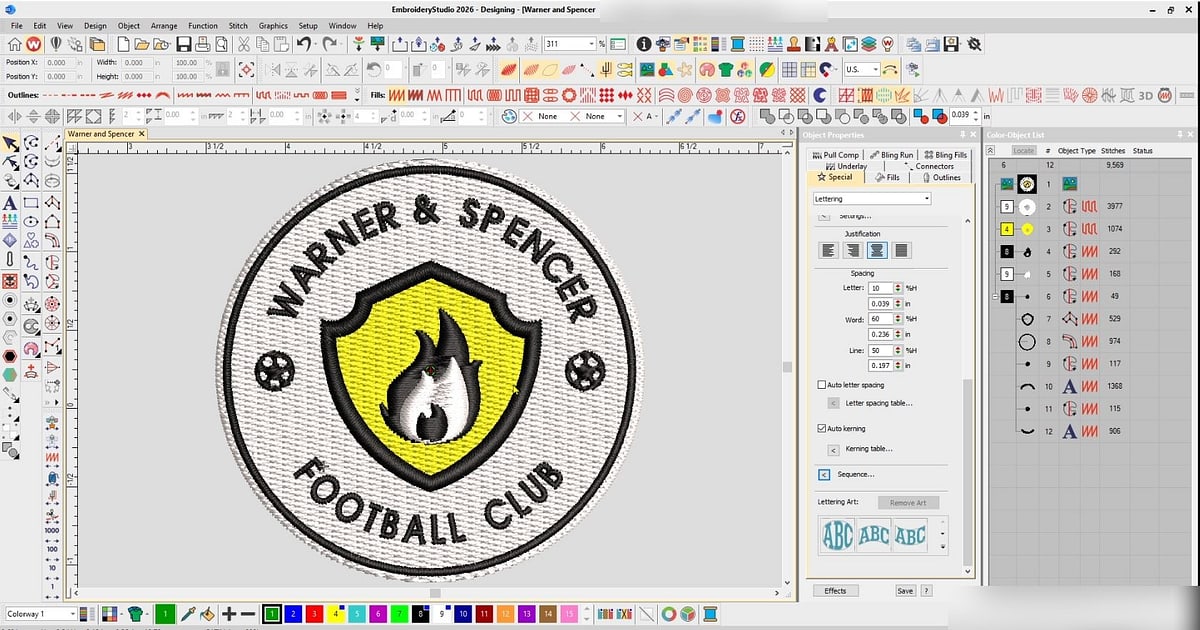
Take something ordinary. A round club badge: a colored ring, a shape in the middle, and the club name curved around the top in 10mm letters. Left chest, on a polo.
Through auto digitizing, the software finds three color areas and fills them. The ring gets the same density as the center. The letters get traced at the size they arrived. The order is whatever the trace produced, so the machine works around the badge in whatever sequence the shapes were found. You get a file in about ten seconds.
Done by hand, the ring gets an edge-run underlay and a satin border built to hold its width around the curve. The center gets a lighter fill than the ring, because it's a bigger area and doesn't need the same coverage. The lettering gets rebuilt rather than shrunk, and if it still won't hold at 10mm the digitizer tells you before stitching rather than after. The sequence runs center outward so the badge doesn't drag itself off-round.
Both files stitch. On a polo, at speed, only one of them stays round.
You don't need the source file. Four things give it away:
The stitch count is too high for the design. Traced files are wasteful. If a simple two-color left-chest logo comes back at thirty thousand stitches, nobody sequenced it. Our guide to how many stitches a design should have has real counts to compare against.
The machine trims constantly. Count the trims on the first run. A lot of short jumps between unrelated parts of the design means the order was never planned.
It was ready immediately. Hand work takes time, which is why normal turnaround runs two to four working days. A file back within minutes of you sending artwork came off a button.
Nobody asked what it's going on. This is the clearest one. A person digitizing properly has to know the fabric before they can set underlay and compensation. If nobody asked, nobody decided.
It isn't a scam, and treating it as one will just cost you time.
For a simple one-color shape with no small text, going on ordinary woven cotton, a traced file is often perfectly usable. For a quick mockup to show a client roughly what a design will look like, it's the right tool. And as a starting point it saves real work: plenty of professionals run a trace first and then rebuild it properly, which is faster than starting from nothing.
That last one is worth knowing about, because it's the honest middle ground. A file that was auto traced and then hand corrected is a hand digitized file. What matters is whether someone made the decisions afterwards, not how the shapes first got there.
This is where the two-dollar quotes come from. Somebody has to be paid for the decisions, and if nobody made any, there's nothing to pay for.
The saving is real but it's a one-off, and the cost of a bad file repeats on every garment you stitch with it. We work through that arithmetic properly in why embroidery digitizing is expensive and in our guide to what embroidery digitizing costs.
The practical rule: match the method to the risk. One shirt for yourself, a traced file is fine. Eighty pieces for a client with a deadline, pay for the decisions.
Turnaround follows the same logic. Auto digitizing is instant because there's nothing to think about and nothing to test. Two to four working days is what it takes to build a file, stitch it, look at what came back and correct it. If someone is quoting hand digitizing prices and delivering in ten minutes, one of those two things isn't true.
If you're deciding whether to take this on for a single design, start with can you digitize your own design at home. The skill being described here isn't software operation. It's knowing what a needle does to cloth, which is why people who have run machines digitize better than people who haven't.
That judgment is learnable, and it's what our Digitizing Mastery course teaches, from the fundamentals through to logos, monograms and agbada you can charge for. Most students are digitizing the basics inside a week and building from there.
If you'd rather not make the file at all and it isn't a client's own logo, EmbGig has machine-ready designs from digitizers who actually stitch, which skips both the gamble and the wait.
Broadly, yes. The newer tools are better at cleaning up messy artwork and tracing shapes than the old auto button was, but they still don't know what fabric you're stitching on. There's more on where that's heading in can AI replace embroidery digitizers.
Often, yes, and it's usually quicker than starting again. Density, underlay and sequence can all be reworked. What's harder to rescue is small text that was shrunk rather than rebuilt.
No. A badly hand digitized file is worse than a well traced simple shape. The method matters less than whether the person understood what they were doing, which is why you judge the stitch-out rather than the method.
To get a file, obviously yes. To get a garment you can deliver, often no. Time you didn't spend digitizing comes back as thread breaks, a longer run, a test that fails, or a piece you stitch twice. On a single simple design it wins. Across a production run it usually doesn't.
Because the preview draws the file's intentions on a surface that never moves. Puckering, thread breaks and collapsed lettering all happen in the fabric, and none of them exist in the file for the preview to show.
Auto digitizing traces a picture. Hand digitizing decides how thread should behave on cloth. For simple work on forgiving fabric the gap is small. For anything with small text, a curve, a client or a deadline, the gap is the whole job.
The Academy turns articles like this into proper courses, with video lessons, assessments, and people to learn alongside.