
Every design looks perfect on a screen preview. Here's what a 3D render physically cannot show you about a file, and what to ask for instead.

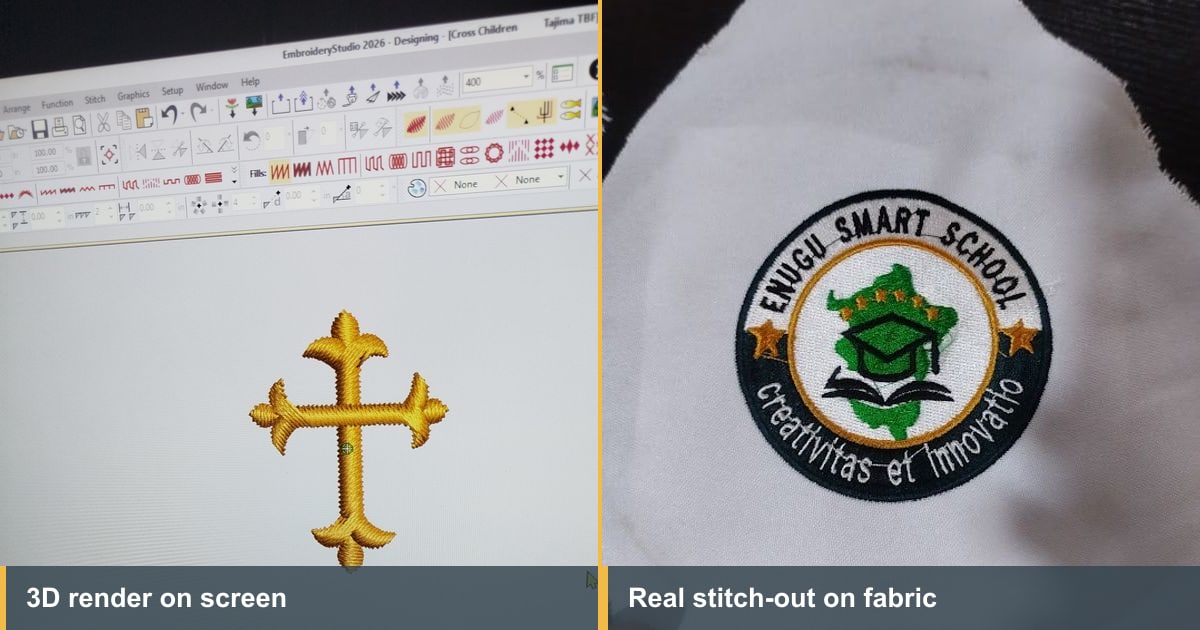
Here's a problem almost nobody warns you about. On a screen, a brilliant file and a terrible one look about the same.
Every digitizing portfolio you've ever browsed is full of clean, glowing designs with perfect stitches catching perfect light. Most of those images never touched fabric. They're 3D renders, generated by the software from the file, and they are the single easiest thing in this trade to make look impressive.
I've been digitizing and running machines for over fifteen years. Here's what a render actually is, what it can't tell you, and how to get proof that means something.
When you build a design, your software can draw a picture of what those stitches would look like. It knows where every stitch goes, what color it is and which direction it lies, so it shades them, adds a bit of sheen, and shows you a preview.
That preview is genuinely useful. It's how a digitizer checks their own work as they go, and it catches plenty of problems: gaps, wrong colors, a shape that hasn't filled properly.
But understand what it is. A render is a drawing of what the file intends. It's the plan, not the outcome. The software is showing you stitches floating in a perfect world where fabric doesn't move, thread never breaks, and tension is always right.
This is the heart of it. These aren't things renders happen to get wrong. They're things a render has no way of knowing.
So a design can be perfect in the preview and wrong on the shirt. That's not a rare edge case. It's the normal failure mode, and it's exactly why good embroidery digitizing is judged on fabric and nowhere else.
Useful when someone sends you a portfolio and doesn't say which is which. Renders give themselves away:
None of this makes a render dishonest on its own. Showing one and calling it a preview is fine. Showing one and letting you believe it's a finished garment is not.
This one catches people out, and it's worth saying on its own.
Someone sends you a picture that is obviously a photograph. You can see the monitor bezel, the desk, maybe a reflection. It feels like proof because it's clearly been taken with a camera rather than exported from software.
It isn't proof of anything. Photographing a render just gives you a slightly worse render. The design still hasn't met fabric. The same applies to a screenshot of the design window, a video of the design scrolling on screen, or a picture of the machine's own display before it starts stitching.
The question is never how the image was captured. It's whether thread went through cloth before the picture was taken.
Ask for a photograph of the design sewn out, on similar fabric to yours, taken with a phone in ordinary light.
Three parts of that matter. Similar fabric, because a logo proven on a stiff cotton polo proves nothing about your stretchy sports shirt. Ordinary light, because flattering angles hide puckering. And a phone, because you want the thing itself, not a production photograph.
Then look at it properly. Our guide to hiring an embroidery digitizer has the checklist for reading a stitch-out when you don't digitize yourself, including the one almost nobody asks for: a photo of the back.
If someone won't produce a stitch-out at all, that answer is itself the information you needed.
Worth being fair about this, because renders aren't a trick.
For checking colors and placement before stitching, a render is the right tool and faster than anything else. For approving a layout with a client who just wants to see roughly what they're getting, it's fine. For a simple one-color design on ordinary fabric, the gap between preview and reality is small.
The gap opens up exactly where the money is: small text, caps, native wear, anything on fabric that moves, anything dense. Those are the jobs where a render tells you least and costs you most.
There's a rough test for when to insist. Ask yourself what happens if this file is wrong. If the answer is that you re-run one shirt and shrug, a render is plenty. If the answer involves a client, a deadline, or a stack of garments you've already paid for, you want to see thread.
The same thing applies in reverse, and it's the habit that separates people who improve from people who plateau.
If you only ever judge your work in the preview window, you're learning what your software thinks, not what thread does. Stitch your designs out. Look at what came back. Change one thing and stitch again. That loop is where the judgment behind good embroidery digitizing actually comes from, and there's no shortcut through it.
It's also the part our Digitizing Mastery course is built around, along with the seven common digitizing mistakes that show up on fabric and never on screen.
Same rule, different seller. A marketplace listing showing only a glossy render tells you nothing about whether the file runs.
EmbGig exists partly for this reason: machine-ready designs from digitizers who actually stitch, rather than files nobody has ever run. For anything that isn't a client's own logo, it saves you both the gamble and the wait.
No. A render is the software's drawing of what the file should do. A stitch-out is the design actually sewn on fabric. Only one of them has met a needle.
From a photo of a real stitch-out, yes, a fair amount. Look at the small text, the edges of satin borders, whether the fabric lies flat, and whether bare cloth shows where two colors meet. From a render, no.
Mostly because they're free and instant. You build the file, you export the picture, you're done. A stitch-out costs fabric, stabilizer, thread and machine time on every single design. That cost is the reason it means something.
Common, and reasonable, especially if they're working in another country. Ask them to stitch on the closest thing they have and to tell you what it was. A logo tested on a piece of similar-weight knit is far more use than one tested on nothing. Then run your own test on the actual garment before you commit to the full order. Somebody has to put it on the real fabric, and if it isn't them, it's you.
For a one-off, usually not. Before running a hundred garments, always. One piece of scrap against a hundred ruined shirts isn't a close call, and it's the cheapest insurance in this business.
A render shows you the plan. Fabric shows you the result. Good embroidery digitizing is the work of making those two things match, and you cannot judge it from a screen no matter how good the picture looks.
The Academy turns articles like this into proper courses, with video lessons, assessments, and people to learn alongside.